The Claude Skills Starter Kit: 10 Skills to Install Today, and Ideas for Every Role
By Mojeed Abisiga, AI Learning Companion · AI Tools & Tutorials ·
Ten ready-made Claude skills to download, how to install and use them in Claude and Claude Code, a library of skills for twenty jobs, and how to make and check your own.
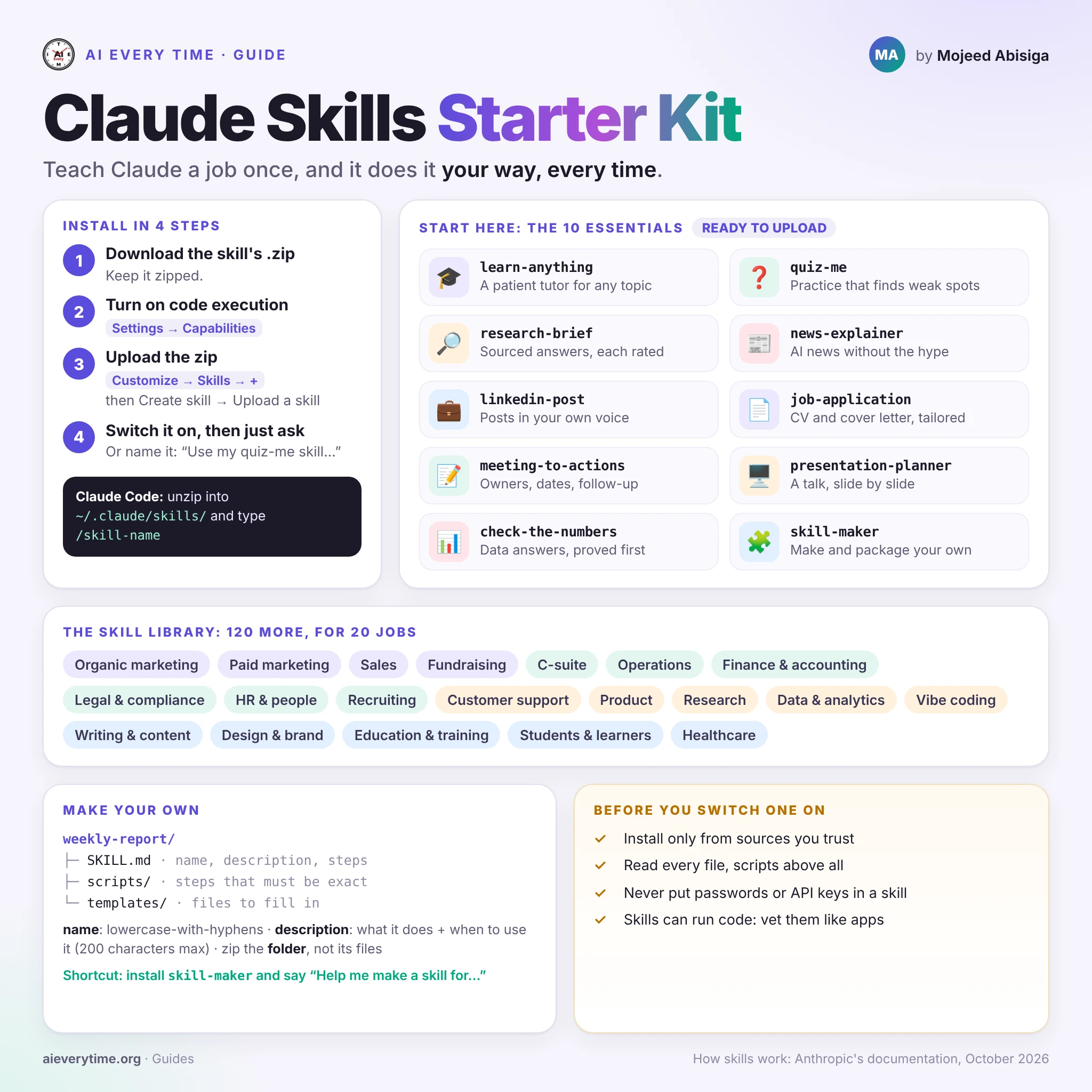
Teach Claude a job once, and it does it your way every time
Most people use Claude the same way every day: they paste in the same long instructions, explain the same format again, and correct the same mistakes. A skill ends that. It is a small folder of instructions, and sometimes scripts and templates, that teaches Claude one job the way you want it done. You install it once. From then on, Claude picks it up whenever a request needs it.
This guide gives you a starter kit of ten skills to download, written for AI Every Time. It shows you how to install them in a few minutes, and it comes with a library of skills for twenty jobs. It ends with how to make your own, and how to stay safe while you do.
What a skill is
Every skill is a folder with one required file, SKILL.md. Its first lines hold two pieces of information:
- a name, which is also the command you can type, such as
/learn-anything; - a description of what the skill does and when to use it.
Below that come the instructions: steps, rules, examples and checklists. A skill can also carry extra files: reference notes, templates to fill in, and scripts for steps that must come out exactly right every time.
Skills load in layers, which is why you can install many of them without slowing Claude down: